
What is an eSIM in a smartwatch?
An eSIM smartwatch can connect to cellular networks without being tethered to your phone. Instead of a tiny plastic SIM card slot (which would be impractical on something strapped to your wrist), an eSIM is a chip soldered directly onto the watch’s motherboard. Your carrier provisions it remotely, and you get calls, texts, and data right on the watch.
This matters more than it might sound. Leave your phone at home during a run, and you can still stream music, get directions, or call for help. The GSMA, the industry body behind eSIM standards, reports that eSIM adoption in wearables has grown significantly since 2020, with smartwatches leading the charge.
If you already know what an eSIM is, the smartwatch version works on the same principle. The main difference is that most smartwatch eSIMs share your phone’s number rather than using an independent line.
Which smartwatches support eSIM?
Not every smartwatch has cellular capability. You need a model explicitly sold as “GPS + Cellular” or “LTE.” Here is what is available right now.
Apple Watch
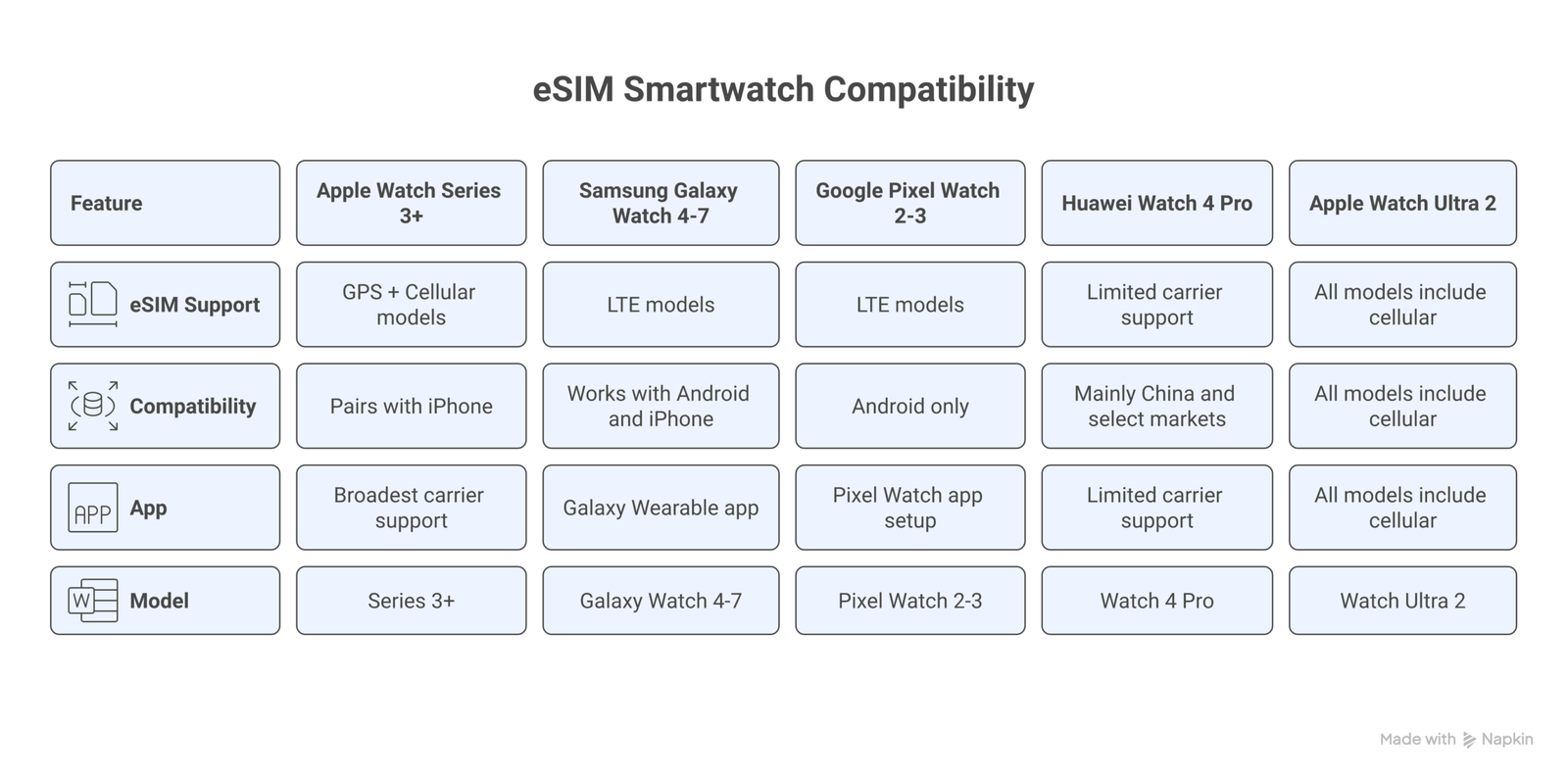
Every Apple Watch from Series 3 onward has a cellular variant. The current lineup includes the Apple Watch Series 10, the Apple Watch Ultra 2, and the Apple Watch SE (2nd generation). Apple uses an eSIM that mirrors your iPhone’s number through a feature called Number Sharing, managed by your carrier.
Samsung Galaxy Watch
Samsung’s Galaxy Watch 7 and Galaxy Watch Ultra both offer LTE models with eSIM. Older models like the Galaxy Watch 6, Watch 5, and Watch 4 also have cellular variants. Samsung uses its own Galaxy Wearable app to handle eSIM activation, which works with both Android phones and (with some limitations) iPhones.
Google Pixel Watch
The Google Pixel Watch 3 comes in an LTE version with eSIM support. Setup goes through the Google Pixel Watch app on Android. There is no iPhone compatibility here.
Other brands
Huawei Watch 4 Pro and some Xiaomi models offer eSIM in certain markets, though carrier support can be limited outside China. Garmin and Fitbit watches do not support eSIM or cellular connectivity at the time of writing.
✓ Quick compatibility check
- ✓ Apple Watch Series 3 and later (GPS + Cellular models only)
- ✓ Samsung Galaxy Watch 4, 5, 6, 7, and Ultra (LTE models)
- ✓ Google Pixel Watch 2 and 3 (LTE models, Android only)
- ✓ Huawei Watch 4 Pro (limited carrier support)
How eSIM smartwatch plans work
Smartwatch eSIM plans are different from the standalone eSIM plans you would buy for a phone. Most carriers offer what they call a “watch line” or “NumberShare” add-on that extends your existing phone plan to the watch. You keep the same phone number, and the watch uses a small portion of your data allowance.
The cost is usually between $5 and $15 per month on top of your regular plan. In the US, T-Mobile charges $10/month for its DIGITS watch line. AT&T charges $10/month for NumberSync. Verizon runs $10/month as well. Some carriers include watch lines free with premium plans.
In the UK, Vodafone’s OneNumber costs £6/month, while EE charges £5/month for their Connected Watch plan. These plans share your existing data and minutes.
One thing to know: these watch add-on plans are tied to your domestic carrier. If you travel internationally and want your watch to work, you will need international roaming enabled on your main plan. The watch follows whatever roaming rules apply to your phone line. For travel-specific eSIM options on phones, you might find our eSIM vs roaming cost comparison useful.
💡 Pro Tip
Before buying a cellular smartwatch, check your carrier’s compatibility page. Not every carrier supports every watch model, and some MVNOs (smaller carriers that use the big networks) do not offer watch plans at all.
Setting up eSIM on your smartwatch
The setup process varies by brand, but the basic flow is the same: pair the watch, open the companion app, and follow the cellular activation prompt. Here is how it works for each platform.
Apple Watch setup
- Open the Watch app on your iPhone.
- Tap Cellular in the My Watch tab.
- Tap Set Up Cellular.
- Follow your carrier’s prompts. Some carriers activate instantly; others send a confirmation text.
- Once active, you will see green dots on the cellular icon in Control Center on your watch.
Apple has detailed instructions on their support page for Apple Watch cellular setup.
Samsung Galaxy Watch setup
- Open the Galaxy Wearable app on your phone.
- Go to Watch Settings > Mobile Plans.
- Select your carrier and follow the activation steps.
- You may need to scan a QR code or enter a confirmation code from your carrier.
Google Pixel Watch setup
- Open the Pixel Watch app on your Android phone.
- During initial pairing, choose Activate mobile network.
- Select your carrier and complete activation.
- If you skipped this during setup, go to Settings > Connectivity > Mobile on the watch itself.
Battery life with cellular turned on
This is the trade-off nobody loves talking about. Turning on cellular drains your watch battery faster. How much faster depends on usage, but expect roughly 30-50% less battery life compared to Bluetooth-only mode.
Apple says the Apple Watch Series 10 gets up to 18 hours with “all-day” use, but that assumes a mix of cellular and Bluetooth. If you are streaming music over LTE during a long run, expect less. Samsung’s Galaxy Watch 7 quotes similar numbers.
A practical approach: keep cellular off by default and let the watch connect through your phone’s Bluetooth when it is nearby. The watch switches to cellular automatically when your phone is out of range. This way you get the safety net of independent connectivity without constantly draining the battery.
📝 Important note
Streaming audio over cellular uses significantly more battery than cached or downloaded music. Download playlists to your watch before heading out if battery life matters to you.
What you can actually do without your phone
Once your eSIM smartwatch has its own cellular connection, you can do quite a bit independently:
- Make and receive calls using your regular phone number
- Send and receive texts (iMessage on Apple Watch, standard SMS on others)
- Stream music from Apple Music, Spotify, or YouTube Music
- Get navigation directions via Apple Maps or Google Maps
- Use emergency SOS, which works even without a plan in many countries
- Receive notifications from any app that supports the watch
- Make contactless payments via Apple Pay, Google Pay, or Samsung Pay
What you cannot do well: browse websites (the screen is too small and most watches lack a real browser), take photos, or run most phone apps. The watch is a lifeline, not a phone replacement. According to FCC guidelines, cellular-enabled watches can connect to 911 even without an active plan, which makes them genuinely useful as safety devices during outdoor activities.
How much does an eSIM smartwatch cost?
The cellular version of any smartwatch costs more than the GPS-only version. Here is what you are looking at in March 2026:
| Watch | GPS only | GPS + Cellular | Difference |
|---|---|---|---|
| Apple Watch Series 10 (42mm) | $399 | $499 | +$100 |
| Apple Watch SE (2nd gen) | $249 | $299 | +$50 |
| Samsung Galaxy Watch 7 (44mm) | $329 | $379 | +$50 |
| Google Pixel Watch 3 | $349 | $399 | +$50 |
| Apple Watch Ultra 2 | N/A (all cellular) | $799 | – |
On top of the hardware premium, remember the monthly carrier fee ($5-$15/month). Over two years, that adds $120-$360 to the total cost of ownership. Whether that is worth it depends on how often you leave your phone behind. If you are a runner, cyclist, or someone who likes going to the beach without worrying about their phone, the cost makes sense fast.
eSIM smartwatch vs standalone travel eSIM
There is an important distinction here. The eSIM in a smartwatch is not the same as the travel eSIMs you can buy from providers like Airalo or Holafly. Smartwatch eSIMs are carrier-managed and tied to your phone’s plan. You cannot download a random travel eSIM onto your Apple Watch the way you would on an iPhone.
This means if you travel abroad, your smartwatch’s connectivity depends on your carrier’s international roaming terms. It is one of the bigger limitations of smartwatch eSIM compared to phone eSIM. Some carriers like T-Mobile include international roaming in their plans, while others charge extra.
For travelers who want independent connectivity on their phones while abroad, check our guide on the best eSIM for short trips. Your watch will tag along on whatever roaming arrangement your main line has.
Common issues and how to fix them
Setting up eSIM on a smartwatch does not always go smoothly. Here are the problems people run into most often:
“Cellular setup is not available”
This usually means your carrier does not support your watch model, or your plan type is not eligible. Contact your carrier to confirm they support smartwatch plans. Prepaid plans often do not qualify.
Activation stuck or failing
Restart both your phone and watch, then try again. Make sure your phone’s OS is fully updated. Apple Watch requires the latest version of iOS and watchOS. If it still fails, remove the watch from the app, unpair, and re-pair from scratch.
No cellular signal on the watch
Check that Airplane Mode is off on the watch. Also check that your carrier’s plan is active. On Apple Watch, go to Settings > Cellular to verify the plan status. If you see a red X, your plan may have been deactivated by your carrier. For more troubleshooting steps, see our eSIM troubleshooting guide.
Poor connection quality
Smartwatch antennas are tiny compared to phone antennas. You will get weaker signal in areas where your phone barely has coverage. This is normal. Smartwatches also typically connect to LTE (4G) only and do not support 5G, which can affect speeds in some areas.
Who should get a cellular smartwatch?
A cellular smartwatch is worth the extra cost if you regularly find yourself without your phone and still need to be reachable. That includes:
- Runners and cyclists who want music and safety without carrying a phone
- Parents who want kids to have a way to call home (Apple Watch SE with Family Setup lets kids use a watch without their own iPhone)
- Anyone with an active outdoor lifestyle who might need emergency calling
- People who want to leave their phone behind at the beach, gym, or during errands
If your phone is always within arm’s reach, the GPS-only version will do everything you need. The watch connects via Bluetooth or Wi-Fi, and you save the hardware premium and monthly fee. According to research from Statista, about 30% of smartwatch buyers choose the cellular model, which suggests most people find the GPS-only version sufficient.
⚠️ Disclaimer
Prices, carrier plans, and device specifications referenced in this article are accurate as of March 2026 and may change. Check your carrier’s website and the manufacturer’s official pages for the most current pricing and compatibility information.
Frequently asked questions
Can I use my smartwatch eSIM without a phone?
Yes, that is the whole point of a cellular smartwatch. Once the eSIM is activated, the watch can make calls, send texts, and use data independently. However, the initial setup requires a paired phone, and some features (like installing new apps) still need the companion phone app.
Do I need a separate phone number for my smartwatch?
No. Most smartwatch plans use Number Sharing, which means the watch uses the same phone number as your main device. Calls and texts come to both your phone and watch.
Can I use a travel eSIM on my smartwatch?
Currently, no. Smartwatch eSIMs are managed by your domestic carrier and cannot be replaced with third-party travel eSIM profiles from providers like Airalo or Holafly. For international travel, your watch relies on your carrier’s roaming agreements.
Does cellular use a lot of data on a smartwatch?
Not really. Notifications, texts, and calls use very little data. Music streaming uses the most, at roughly 50-100 MB per hour depending on quality settings. Most people use under 500 MB per month on their watch.
Is Apple Watch or Galaxy Watch better for eSIM?
Both work well. Apple Watch has broader carrier support globally and the setup process tends to be smoother. Samsung Galaxy Watch offers more flexibility with Android phones and often costs less for the cellular upgrade. If you have an iPhone, go with Apple Watch. If you have an Android phone, Galaxy Watch or Pixel Watch are your best options.