
Why eSIM Makes Family Travel Easier
Traveling with your family means juggling passports, snacks, boarding passes, and the inevitable “are we there yet?” loop. The last thing you want is to land in a foreign country and spend an hour at an airport kiosk trying to buy four separate SIM cards while your kids melt down in the arrivals hall. That’s where an eSIM for family travel changes the equation. You can set up data plans on everyone’s phones before you even leave home.
An eSIM is a digital SIM embedded in modern smartphones, tablets, and smartwatches. Instead of swapping tiny plastic cards, you scan a QR code or download a profile through your device settings. For families with multiple devices, this eliminates the logistical nightmare of buying, labeling, and keeping track of physical SIM cards for each person. The GSMA, the global body overseeing mobile standards, reports that eSIM adoption has grown over 300% since 2022, with travel being one of the primary use cases.
Most families traveling internationally face a tough choice: pay steep roaming fees from their home carrier, or deal with the hassle of local SIM cards. A comparison of eSIM vs roaming costs shows that families can save 60-80% by switching to eSIM data plans instead of relying on international roaming from carriers like AT&T, Vodafone, or T-Mobile.
How many devices can you manage with eSIM?
Here’s the practical reality. Most modern phones support storing 8 or more eSIM profiles, though only one or two can be active at a time. Apple’s iPhone 15 and 16 lineup supports up to 8 eSIM profiles according to Apple’s official support page. Samsung Galaxy S24 and S25 devices handle multiple eSIM profiles as well, as documented in Samsung’s support center. Google Pixel phones from the Pixel 7 onward also support eSIM natively.
For a family of four with two parents and two older kids, you’d typically need four separate eSIM plans. Most eSIM providers let you purchase multiple plans under a single account, which simplifies billing and management. Some providers, like Airalo and Holafly, even offer family-friendly options where you can manage all your eSIMs from one app on your phone. That means one parent can handle setup, top-ups, and data monitoring for everyone.
Younger kids who don’t have their own phone can still benefit. If you’re handing them an iPad or older iPhone for entertainment, these devices often support eSIM too. Apple’s iPad compatibility list confirms that most iPads from 2018 onward (iPad Pro 3rd gen, iPad Air 3rd gen, iPad Mini 5th gen, and later) include eSIM capability. That means your kids can use Maps, translation apps, or video calls with grandparents back home without needing a separate data plan on your phone’s hotspot.
✓ Benefits of eSIM for families
- ✓ Set up all devices before departure, no airport SIM shopping
- ✓ Manage everyone’s data from a single app on one phone
- ✓ No tiny SIM cards to lose (parents of young kids, you know the risk)
- ✓ Each device gets its own data connection, no hotspot dependency
- ✓ Save 60-80% compared to carrier roaming charges
Best eSIM providers for family travel in 2026
Not every eSIM provider is equally suited for families. You want one that lets you buy multiple plans easily, offers shared or group management features, and provides enough data for kids who will inevitably want to stream YouTube in the hotel. Here’s what I’d recommend based on real-world family travel scenarios:
Airalo is probably the most popular option for multi-device families. You can purchase multiple eSIM plans within a single account and share QR codes with family members for installation. They cover 200+ countries and regions, with plans starting around $4.50 for 1GB. For a week-long European vacation, a family of four might spend $40-60 total on data. Their app tracks data usage per plan, so you can see if your teenager is burning through data on TikTok. Airalo’s website has a plan finder that lets you compare options by destination.
Holafly stands out because of their unlimited data plans. If your family doesn’t want to worry about data caps, their plans start at roughly $6/day for unlimited data in supported countries. The catch: you need a separate purchase for each device, and unlimited plans aren’t available in every country. Check their destination coverage page before committing.
Nomad eSIM offers competitive pricing for multi-country trips. If your family vacation includes stops in multiple countries (say, a European road trip through France, Italy, and Spain), their regional plans can be more cost-effective than buying country-specific eSIMs for each stop. Compare this with the best global eSIM providers to find the right fit.
Google Fi is worth mentioning for families already in the Google ecosystem. Their international coverage works in 200+ countries, and family plans let you add up to 5 additional members. According to Google Fi’s international rates page, data abroad costs $10/GB with automatic bill protection. The downside: it’s US-based, so it works best for American families traveling abroad.
💡 Pro Tip
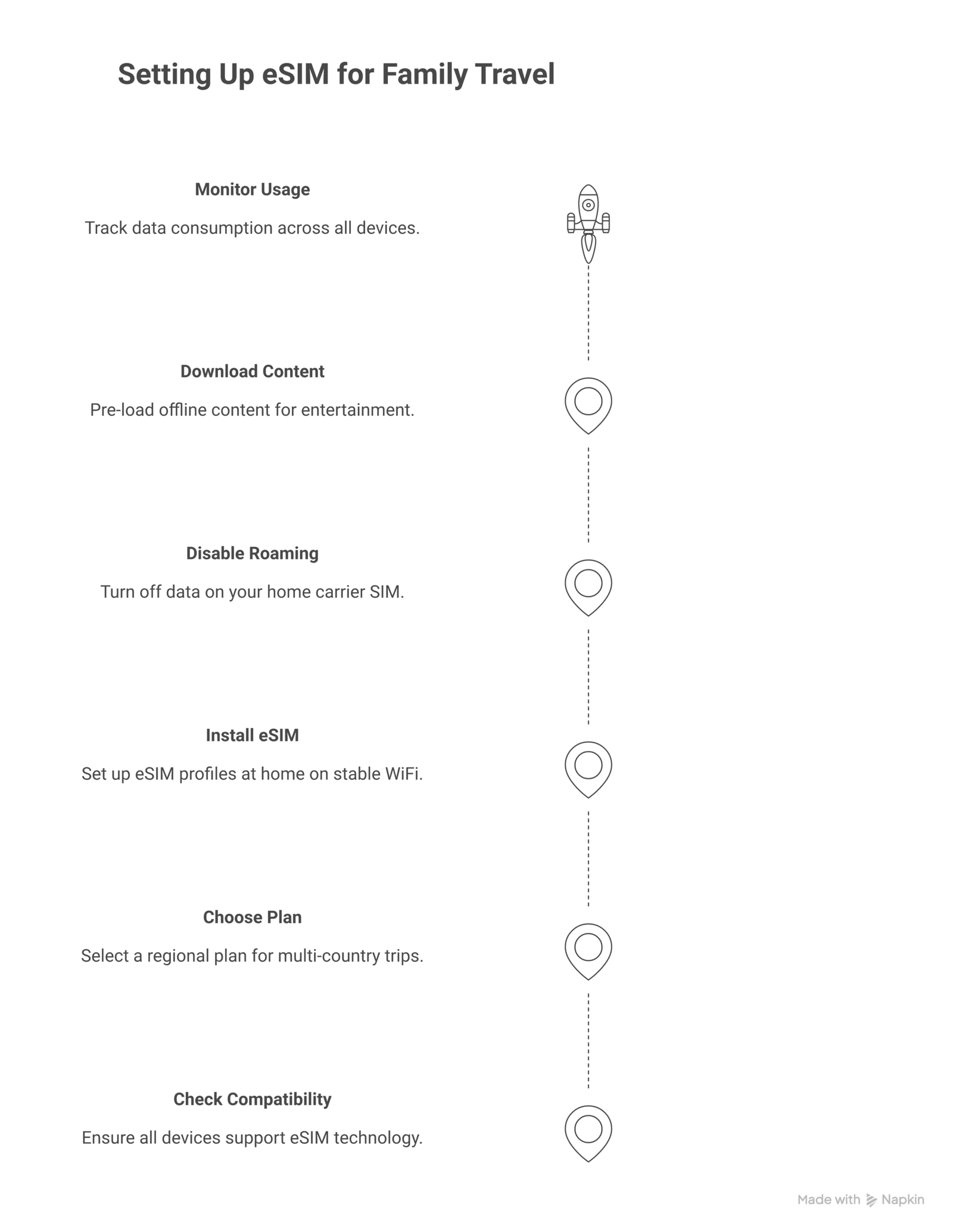
Buy and install your eSIM plans before leaving home while you still have stable WiFi. Most providers let you activate up to 30 days in advance. This way, when you land, you just toggle the eSIM profile on and you’re connected in seconds.
Setting up eSIM on your family’s devices
The setup process is straightforward, but it differs slightly between iPhone and Android. If you’re doing this for four devices in one sitting, budget about 20-30 minutes total. Here’s the breakdown:
For iPhones (iOS 17+): Go to Settings > Cellular > Add eSIM. You can either scan the QR code provided by your eSIM provider, or enter the activation details manually. Once added, label the plan (I recommend naming it something obvious like “Italy Trip” or “Family Vacation Data”) so you don’t confuse it with your home plan later. Our guide to activating eSIM on iPhone walks through each step with screenshots.
For Android (Samsung, Pixel, etc.): Go to Settings > Connections > SIM Manager > Add eSIM. Samsung and Pixel devices will walk you through scanning a QR code. The process takes about 2-3 minutes per device. One thing to watch for: some older Android phones require a carrier update before eSIM activation works properly. The Google support article on eSIM setup covers common troubleshooting steps.
For iPads and tablets: The process mirrors the iPhone setup. Go to Settings > Cellular Data > Add eSIM. One difference: iPads are data-only devices, so you won’t need to worry about configuring voice or SMS settings. Just data.
After setting up each device, test the connection before your trip. Turn off WiFi, enable the eSIM data plan, and open a browser. If it loads, you’re good. If not, check that data roaming is enabled in your cellular settings. This 30-second test can save you a lot of frustration at your destination.
How to manage data usage across your family
Data management is where family eSIM travel gets interesting. Kids use data differently than adults. A parent might need Maps and messaging, maybe 500MB per day. A teenager streaming music and scrolling Instagram could burn through 1-2GB daily without blinking. A younger kid watching downloaded Netflix episodes uses zero data (if you planned ahead) or a catastrophic amount if you didn’t download anything beforehand.
Here’s what works: download entertainment content before the trip. Netflix, Disney+, Spotify, and YouTube all support offline downloads. According to Netflix’s help center, a single movie download uses about 250MB at standard quality. Load up a few movies and shows for each kid before you leave, and you’ve just cut your family data needs by half or more.
Most eSIM provider apps show real-time data consumption. Airalo’s app, for example, displays remaining data for each active eSIM plan. Check it once a day to make sure nobody’s running low. If someone is burning through data faster than expected, you have two options: buy a data top-up through the app (usually takes 2 minutes), or enable low-data mode on their device. On iPhone, this is under Settings > Cellular > Cellular Data Options > Low Data Mode. Android has a similar Data Saver option.
For families who don’t want to buy separate plans for each device, there’s another approach: use one phone as a mobile hotspot. Buy a larger data plan (10-20GB) on one parent’s phone and share the connection. The tradeoff is that everyone needs to stay within WiFi range of that phone, and battery drain on the hotspot device will be significant. Bring a power bank if you go this route. The FCC’s guide on mobile broadband explains how hotspot connections work and their limitations.
📝 Important Note
Some eSIM plans restrict hotspot/tethering. Holafly’s unlimited plans, for instance, don’t support tethering in many countries. If your strategy depends on sharing one connection, verify hotspot support before purchasing. Airalo and Nomad generally allow tethering on their standard plans.
Cost breakdown: eSIM for a family of four
Let’s put real numbers on this. Say you’re a family of four going to Spain for 10 days. Here’s what the math looks like:
Option 1: Carrier roaming
Most US carriers charge $10/day per line for international day passes. That’s $10 x 4 devices x 10 days = $400. European carriers like Vodafone or Three charge similar rates for out-of-plan roaming, typically €5-12/day per device.
Option 2: Local SIM cards
A prepaid Spanish SIM with 10GB costs about €15-20 each. For four devices: €60-80, plus the hassle of finding a phone shop, waiting in line, and dealing with ID requirements. The Spanish telecom regulator (CNMC) requires ID registration for prepaid SIMs, which can complicate things for tourists.
Option 3: eSIM plans
An Airalo Spain 5GB/30-day plan costs about $14. For four devices, that’s $56. Need more data? A 10GB plan runs about $23 each, so $92 for four. Either way, you’re looking at 75-85% savings compared to carrier roaming, with zero time wasted at phone shops.
The savings scale up for longer trips or bigger families. If you’re comparing options across different providers, check out our breakdown of eSIM vs physical SIM cards for a detailed look at cost differences.
What about kids’ devices without eSIM support?
Not every kid has a phone with eSIM support. Older hand-me-down phones, budget Android devices, and some kids’ tablets only accept physical SIM cards. In that case, your options are:
Tethering from a parent’s phone: Give the kid’s device WiFi access through your phone’s hotspot. This works for occasional use (messaging, looking things up) but drains the parent’s battery and data quickly if the kid starts streaming.
Portable WiFi device: Rent or buy a pocket WiFi hotspot that supports eSIM. The Solis X from Skyroam, for instance, accepts eSIM profiles and creates a WiFi bubble that up to 10 devices can connect to. This is useful for families where some devices lack eSIM support but everyone needs connectivity.
Local SIM for non-eSIM devices only: Buy a physical prepaid SIM at your destination for the one or two devices that need it, and use eSIM on everything else. This hybrid approach keeps things simple where possible and only adds friction for the devices that require it.
If you’re unsure which devices in your family support eSIM, Apple’s comparison page lists eSIM support for every iPhone model. For Android, check your phone’s Settings > About Phone > SIM Status. If it shows “eSIM” or “eUICC,” you’re good to go.
Safety and parental controls with eSIM
Giving your kids mobile data abroad raises the same parental control questions you deal with at home, with a few travel-specific wrinkles. The good news: eSIM doesn’t change how parental controls work. If you’ve set up Screen Time on iOS or Family Link on Android, those restrictions carry over regardless of which data plan the device is using.
Apple’s Screen Time lets you set daily limits on specific apps, restrict web content, and even pause internet access entirely during family dinner or bedtime. Google’s Family Link does the same for Android devices, including location tracking so you can see where your kid’s phone is on a map.
One travel-specific tip: if your kids don’t need constant data access, don’t activate their eSIM plan until they actually need it. Most providers start the plan timer from activation, not purchase. Buy the eSIM in advance but wait to activate until you need it. This way, you save data days and maintain control over when each device goes online.
For families with younger children who primarily use tablets for offline games and videos, you might not need a separate data plan at all. Download what they need on hotel WiFi each evening, and keep their device in airplane mode during the day. Simple, free, and eliminates any data worries entirely. For more on managing travel tech essentials, we have a full guide covering the gear every connected traveler should consider.
Common mistakes families make with eSIM abroad
After years of covering eSIM travel, some mistakes show up over and over. Here are the ones that trip up families the most:
Forgetting to turn off the home carrier’s data roaming. If you activate an eSIM but leave your home line’s data roaming enabled, your phone might still use the home line for some data, racking up roaming charges. Go to each device’s cellular settings and disable data for your home SIM line while abroad. Keep the eSIM line active for data instead.
Buying country-specific plans for a multi-country trip. If you’re visiting three countries in two weeks, don’t buy three separate eSIM plans. Get a regional plan (Europe, Southeast Asia, etc.) that covers all your stops. It’s cheaper and far less hassle than juggling multiple active plans. Our article on the best eSIM for short trips covers how to pick the right plan size.
Not checking device compatibility beforehand. Assume nothing. Check every family member’s device before the trip. Some phones bought through carriers are SIM-locked and won’t accept eSIM profiles from third-party providers, even if the hardware supports it. Contact your carrier to confirm unlocking status. The FCC’s guide on phone unlocking explains your rights as a consumer.
Waiting until arrival to set things up. Airport WiFi is often slow and unreliable, which makes downloading eSIM profiles frustrating. Do it at home. Every provider recommends this, and it takes less than 5 minutes per device over a stable WiFi connection.
⚠️ Disclaimer
Pricing and plan availability mentioned in this article are based on publicly available information as of March 2026. eSIM providers frequently update their plans and pricing. Always verify current rates on the provider’s official website before purchasing. Coverage may vary by country and network partner.
Frequently Asked Questions
Can I use one eSIM plan for all my family’s devices?
No, each device needs its own eSIM plan. An eSIM profile is tied to a specific device, similar to a physical SIM card. However, most providers let you manage multiple plans under one account, making it easy to purchase and monitor data for your entire family from a single app.
Do kids’ smartwatches support eSIM for travel?
Some do, but with limitations. The Apple Watch with cellular capability supports eSIM, but it’s typically tied to the paired iPhone’s carrier plan. Third-party travel eSIMs generally don’t work on smartwatches. For kids’ watches like the Gabb Watch or Xplora, they use their own cellular plans and usually don’t support third-party eSIMs abroad.
What happens if my family runs out of eSIM data mid-trip?
Most providers offer in-app data top-ups that take effect within minutes. Open the eSIM provider’s app, select the plan that’s running low, and purchase additional data. If top-ups aren’t available for your specific plan, you can purchase a new eSIM plan and install it alongside the expired one. The device will switch to the new active profile.
Is eSIM safe for my children’s devices?
Yes. eSIM technology is as secure as traditional SIM cards, and in some ways more secure because it can’t be physically removed and swapped. Your existing parental controls (Screen Time on iOS, Family Link on Android) work exactly the same over an eSIM data connection. You retain full control over content filtering, app restrictions, and usage limits.
Can I keep my home phone number active while using eSIM abroad?
Yes. With dual SIM functionality, your home SIM (physical or eSIM) stays active for calls and texts while the travel eSIM handles data. Set the travel eSIM as your default data line and keep your home line for calls/SMS only. This way, you stay reachable on your regular number without paying data roaming fees.